Blueprint Company Build Tools Tier List
Creative-power rankings for architecture tools in Blueprint by Rillcore.
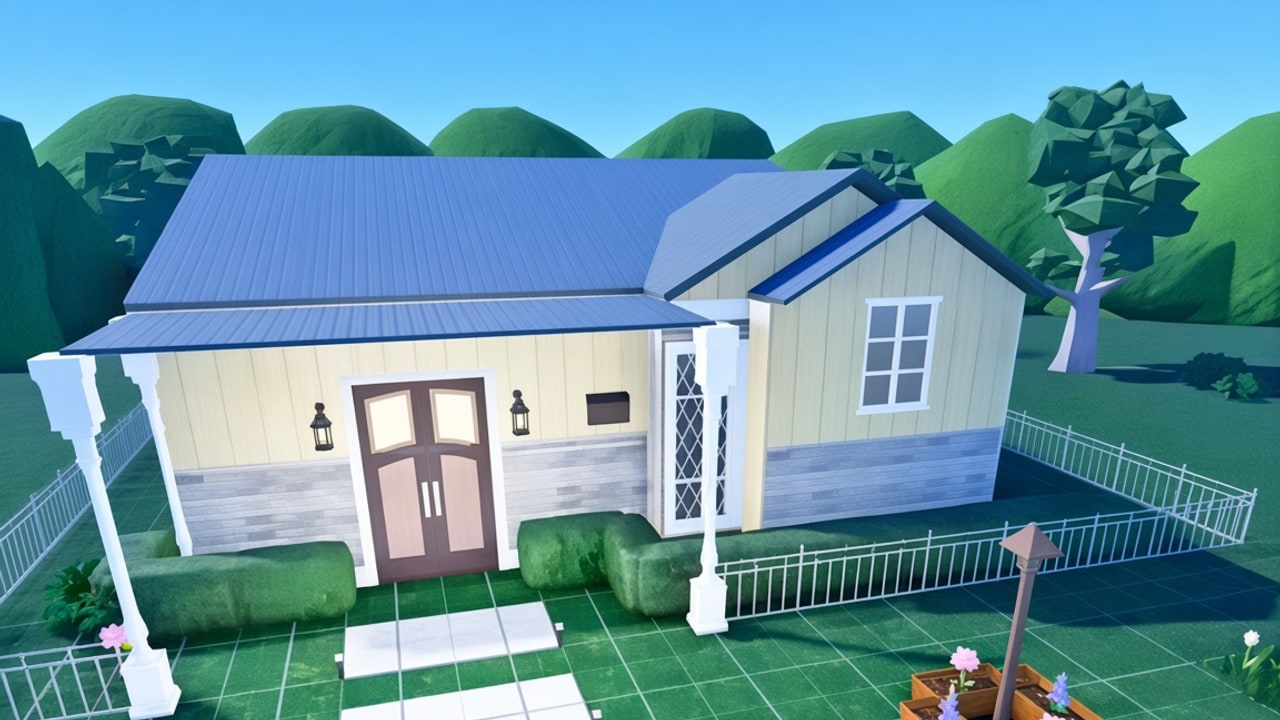
This page expands the Tier List Hub into a full build tools tier list for Blueprint. Rankings reflect creative power on large plots during private testing—not combat stats, not Robux value. Pair this article with the Build Glossary for definitions and Getting Started if you are new to plot workflow.
Blueprint’s promise is simple and rare on Roblox: a free building game with no money system and no gamepasses, aimed at architecture students and detail-obsessed builders. Tools that unlock silhouette, interior narrative, and landscape storytelling climb the list. Tools that only fill space sit lower—even if you use them every session.
S-tier tools
Advanced roof system
Roofs are the skyline. Blueprint lets you adjust pieces independently—height, thickness, overhang per side, rotation before placement, color, and material. Hollow gable roofs with skylights, hip roofs for second stories, and pyramid roofs (including hollow variants) give silhouettes you cannot fake with flat parts alone. When a TikTok stops mid-scroll, it is often a roof edge catching light.
Why S: Highest expressive range per click. Defines “this must be Blueprint” screenshots. High skill ceiling when mixing hollow volumes with interior floors.
Pair with: Tall floor stacks (community demos mention climbing into the mid-teens with basement depth), skylight interiors, and exterior lighting.
Multi-select + advanced transform / scaling
Multi-select turns a catalog into a kitbashing studio. Scale furniture to fit awkward rooms; enlarge single-part props into monumental sculptures; combine transforms to invent custom millwork. Official feature talk notes broad scaling on items (with specific exceptions such as some doors/windows that keep their own systems). Full workflow: Scaling & Transform.
Why S: Multiplies every other catalog piece. Separates “placed furniture” builds from “designed interiors.”
Practice tip: Duplicate a chair set, scale one instance for a lounge and another for a kids’ room, then lock materials so the set still feels coherent.
Fine-grid walls and floors
Very small grids on walls, roofs, and floors enable miniature builds, trim lines, and precise openings. Architecture students care about module sizes; this system respects that instinct.
Why S: Precision is the difference between toy boxes and believable plans. Everything else sits on this foundation.
A-tier tools
Pools and water volumes
Pools are swimmable, with controls for depth, water color, transparency, wave speed, wave height, and pool-wall color. Builders already push beyond rectangles into rivers, lakes, and experimental water features. Water sells luxury villas and park districts instantly.
Why A: Huge showcase impact and flexibility, slightly narrower than roofs/walls because not every plot needs water.
Basements and downward volumes
Basement tools behave like building downward with the same care you give upper floors—walls, floors, and detailing inside. Testers invent tunnels, under-road cuts, and treehouse undercrofts, proving the tool is a generic subterranean brush.
Why A: Vertical storytelling and circulation tricks; pairs with pools when water and underground spaces meet.
Decals and framed art
Decals plus community art competitions fill frames with personality. Interiors without wall art feel unfinished; with curated decals they feel authored. Asset ID workflows and TOS notes: Furniture & Decals.
Why A: Fast narrative, strong in close-up content, dependent on art pipeline growth.
B-tier tools
Landscaping — hills, rocks, outdoor softscape
Scalable hills and rocks help break the flat 1024 pad. Outdoor atmosphere items extend the story beyond the footprint. Landscaping rarely carries a build alone, but weak landscaping can ruin a great house. Site design guide: Landscaping.
Lighting and mood props
Lighting decides whether a night tour feels cinematic or muddy. As more atmosphere items land, expect this band to rise toward A for content creators.
Core furniture library
Beds, tables, kitchen runs, and lounge sets make spaces livable. Scaling rules keep pieces adaptable. Furniture is mandatory, yet without strong walls/roofs it cannot save a weak shell—hence B for creative power, not for importance. Pair with Furniture & Decals and Scaling & Transform.
Situational / unranked specialists
- Doors and windows: Often on dedicated systems; accuracy over free-form scale.
- Stairs and vertical circulation: Critical for playable multi-floor homes; evaluate by clarity of path, not flash.
- Plot privacy controls (private / friends / public): Meta for sharing, not for mesh shaping—see Players Hub for how public plots may be discovered later.
Recommended loadout by build type
Modern villa: S roofs + fine walls, A pools, B landscaping and lighting — see Landscaping for pad framing.
Campus / dorm: Fine walls, multi-select furniture kits, decals, strong circulation—see Furniture & Decals and dorm pacing on related guides.
Landscape folly / park: Pools/water as A+, landscaping upgraded in priority, simpler roofs.
Underground speakeasy: Basements first, then lighting and decals; roofs matter less until the exit pavilion.
Monument / sculpture court: S-tier scaling on single-part props (Scaling & Transform) with restrained softscape.
Common ranking mistakes
- Ranking only by “how new the TikTok is.” New does not equal foundational.
- Ignoring multi-select because it is not a placeable mesh. Selection tools are force multipliers.
- Copying combat-tier templates from other wikis. They do not apply.
- Assuming mobile parity today. Blueprint is PC-first; precision tiers assume desktop input for now.
How ranks will be revised
When public testing opens and patch notes expand lighting, furniture sets, or transform rules, we will reshuffle with dated notes on the Updates Hub. Community showcases from Community Creators also inform whether a tool’s ceiling is theoretical or proven in the wild.
Study plan (one weekend)
Saturday morning: Shell only—walls, floors, one advanced roof.
Saturday afternoon: Hollow roof interior + skylight study.
Sunday morning: Pool courtyard or basement tunnel.
Sunday afternoon: Multi-select furniture pass + decals + night lighting screenshots.
Document what felt clumsy. Those notes become your personal FAQ and make official suggestion forms more useful (Links Hub).
Related reading
- Tier List Hub — snapshot ranks
- Build Glossary — terminology
- Guides Hub — tutorials
- Scripts Hub — why cheats are not a substitute for S-tier skill
Master S-tier systems first. Everything else becomes decoration on a strong architectural idea.
Frequently Asked Questions
Quick answers to the most common questions.
What does S-tier mean on this list?
Tools with the highest creative leverage—expressive range, precision, and showcase impact—especially roofs, fine grids, and multi-select transforms.
Why isn’t furniture S-tier if every build needs it?
Furniture is essential but lower leverage than the systems that shape massing and silhouette. Scaling and multi-select raise furniture’s effective tier when used well.
Do pools outrank basements?
They sit together in A-tier. Choose pools for exterior spectacle and basements for underground narrative; many showcases use both.
Will you add PvP or pet tiers?
No. Blueprint is a building sandbox without that meta. Name-collision games are out of scope.
Where can I see these tools used in a real build?
Watch creator showcases linked from Community Creators and the dorm build video embedded on this page, then practice on your own plot when you have access.